
Wrike logo.
    • For teams

      • Marketing

        Streamline proofing and reporting for seamless campaigns.

      • Creative & Design

        Create high-quality assets and get them approved in record time.

      • Product

        Accelerate your product process, from idea to delivery.

      • Client Services

        Exceed clients’ expectations with expert resources.

      • PMO

        Align strategy with execution and deliver results.

      • IT

        Execute initiatives, optimize workflows, and automate requests.

      • Operations

        Make work flow seamlessly with intuitive management tools.

      • HR

        Manage teams effortlessly with customizable HR features.

      • Legal

        Organize every file, case, and due date in one secure space.

      • Finance

        Centralize all financial tasks, from budgeting to invoicing.

      • See all teams

    • Workflows

      • Campaign Management

        Make marketing magic with end-to-end campaign management.

      • Agency Management

        Take full control of your agency management processes.

      • Client Service Delivery

        Get ahead of the competition with faster client services.

      • Product Lifecycle

        Watch your product lifecycle flow, from concept to customer.

      • Project Portfolio Management

        Manage your complete portfolio, from strategy to results.

      • Creative Production & Content

        Create, collaborate, proof, and approve all in one place.

      • Workflow Management

        Use custom statuses and automate your team workflows.

      • Project Management

        Plan Agile projects, track deadlines, and deliver results.

      • See all workflows

    • For industries

      • Technology

        Build solutions that matter, and deliver faster.

      • Manufacturing

        Enhance operations, accelerate production, and empower teams.

      • Professional Services

        Organize clients, streamline projects, and automate workflows.

      • Finance

        Deliver better, faster financials with automations.

      • Healthcare

        Collaborate cross-functionally in a secure setting.

      • Education

        Unite multiple disparate teams, departments, and colleges.

      • Construction

        Streamline building projects, from scoping to invoicing.

      • Media & Entertainment

        Choose one powerful platform for fast-paced work.

      • See all industries

    • Explore Wrike

      • Take a Product Tour

      • Book a Demo

      • ROI Calculator

      • Customer Stories

      • Start with Templates

    • Features

      • Dashboards

        Fuel better, faster, data-driven decisions with powerful analytics.

      • AI

        Learn about powerful AI and automations with Work Intelligence®.

      • Wrike Whiteboard

        Turn inspiration into execution with powerful visualization tools.

      • Gantt Charts

        Interactive project scheduling across teams.

      • Automation

        Define and trigger automated workflows to eliminate manual efforts.

      • Proofing

        Streamlined proofing and collaboration in one place.

      • Project Resource Planning

        Plan and allocate resources for timely delivery.

      • Project Views

        Get the full picture with customizable, intuitive project views.

      • Kanban Boards

        Instantly view project progress and create customized workflows.

      • Dynamic Request Forms

        Custom forms powered by conditional logic.

      • Approvals

        Keep approvers in the loop from start to finish.

      • Custom Item Types

        Tailor work items to fit your specific workplace.

      • See all features

    • Platform

      • Book a Demo

      • Start with Templates

      • Wrike AI

      • Integrations

      • Security

      • Mobile & Desktop Apps

    • Workflow-Powered Collaboration

      Sync with multiple teams to keep work flowing across your organization.

    • Industry-Leading Security

      We're dedicated to safeguarding data beyond industry standards and ensuring secure collaboration.

    • Pioneering AI and Innovation

      Put the power of data and AI to work for your organization.

    • Invested in Customer Success

      We support customers at every step of their journey from pre-sales to onboarding with 24/7 support.

    • Boundless Configuration

      Customize your workspace to suit the unique needs of every team in your organization.

    • Effortless Scalability

      Add new teams or adjust to rapid growth seamlessly with Wrike’s scalable platform.

    Why Wrike beats the competition

    Find out why 20,000+ of the world’s top companies choose Wrike to manage their workflows

    View comparison
    • Go deeper

      • Resource Hub

        Top assets on productivity, collaboration, and more.

      • Wrike Blog

        Latest news and best practices on project management.

      • Educational Guides

        Guides and tools to unlock better work management.

      • Webinars

        Join our live or on-demand sessions to do your best work.

      • Customer Stories

        Explore Wrike’s case studies for key insights on customer success.

      • Developers

        Connect and build integrations with easy-to-use APIs.

    • Upskill and Connect

      • Training & Certifications

      • Help Center

      • Wrike's Community

      • Premium Support Packages

      • Wrike Professional Services

      • Partners

    Discover our ‘Age of Connected Intelligence’ research

    It’s time to stop experimenting with AI tools, and start excelling with connected intelligence.

    Read more
  • Enterprise
  • Pricing
Contact Sales
    Language selector dropdown with globe icon and list of available languages.
    English
    Dansk
    Deutsch
    Español
    Français
    Bahasa Indonesia
    Italiano
    Bahasa Melayu
    Nederlands
    Norsk
    Polski
    Português (BR)
    Svenska
    Русский
    日本語
    한국어
    中文 (简体)
    中文 (繁體)
Log in
Wrike logo.
Wrike logo.
  • Guide overview
    • What Is Product Management?
      • What Is Product Management? Product Management Definition
      • An introduction to product management
      • What is the difference between marketing and product management?
      • Product manager vs. project manager: What is the difference?
      • What isn't product management?
      • Who works on a product management team?
      • What are important product management skills?
      • Eight popular product management frameworks used by product managers
      • How to create a product management strategy
      • Level up your product management with Wrike
    • What Is a Software Product?
      • What Is a Software Product?
      • Software product definition - platform vs. product
      • What are the components of a software product?
      • How to create a software product - software product development process
      • Software product development models: Agile vs. Waterfall
    • Software Product Manager
      • What is a product manager?
      • What does a software product manager do?
      • Software product manager job description
      • Are product owners and product managers the same?
      • Skills every product manager should have
    • Product Owner
      • Product owner skills
    • Product Management Life Cycle
      • Ultimate Guide to Product Management Lifecycle
      • What is the product life cycle?
      • What is product life cycle management?
      • Why is managing the product life cycle important?
      • Software for managing PLM
    • Product Management Roadmap
      • What Is a Product Roadmap? Roadmapping 101
      • What is a product roadmap?
      • Who designs a product roadmap?
      • What goes into product roadmap planning?
      • What is roadmapping?
      • Roadmap best practices you need to consider
      • How to present a product roadmap to clients
      • What to look for in product roadmapping software
      • Why Wrike could be the roadmap tool for you
      • Introducing Wrike's product roadmap template
    • Product Management Software and Tools
      • Ultimate List of Product Management Software and Tools
      • What is product management software?
      • What are the benefits of product management software and tools?
      • What type of product management tools should you use?
      • How to choose the right product management software
    • Product Backlog
      • What is a product backlog?
      • Benefits of a product backlog
      • What are product backlog items? 
      • How to create a product backlog 
      • Product backlog example 
      • Who is accountable for ordering the product backlog? 
      • Who can provide input into product backlogs? 
      • Ready to build a smarter, more actionable product backlog? 
    • Product Management OKRs
      • Product Management OKR Best Practices
      • What are product management OKRs?
      • Are product OKRs and product roadmaps the same?
      • Why do you need OKRs for product management?
      • How to set up the best product team OKRs?
      • Examples of OKRs
      • Best practices for product management OKRs
    • Product Requirements Documents
      • Everything You Need To Know About Product Requirements Document (PRDS)
      • What is a product requirements document?
      • Who creates product requirement documents?
      • Why do product teams need a product requirements document?
      • How to create a product requirements document
      • Are product requirements documents (PRD) and marketing requirements documents (MRD) the same?
      • Is a product requirement document different from a product design document?
    • Product Management Metrics and KPIs Explained
      • Product Management Metrics and KPIs Explained
      • What are KPIs and metrics?
      • Key metrics for product management
      • KPI examples for product management
      • How to structure product KPIs
      • Product management KPI dashboard
    • Product Analytics
      • Product Analytics Definition and Overview
      • What is product analytics?
      • Why is product analytics useful?
      • Who uses product analytics?
      • How does product analytics work?
      • How can you use product analytics?
      • Essential features for product analytics tools
      • Optimize product performance with Wrike
    • Comprehensive Guide to Lean Product Management
      • Comprehensive Guide to Lean Product Management
      • What is lean product management?
      • Why is lean product management important?
      • How does the lean product management methodology work?
      • Essential lean management principles for product managers
      • Start the lean product management process with Wrike
    • Best Product Management Resources for Product Managers
      • Best Product Management Resources for Product Managers
      • Best product management training and courses
      • Best product management books
      • Best product management conferences and events
      • Level up your product management education
    • Practical Product Management Templates
      • Why use product management templates?
      • Five benefits of using product management templates
      • What are the different kinds of product management templates?
      • Get started with Wrike’s product management templates
    • FAQ
      • Performance
      • Product Backlog
      • Product Lifecycle
      • Product Management
      • Product Management Goals
      • Product Management Strategy
      • Product Management Teams And Roles
      • Product Manager
      • Product Owner
      • Product Prioritization
      • Product Requirements
      • Product Roadmap
      • User Stories
    • Glossary of Product Management Terms
    1. Product Management Guide

    Product Backlog: Create, Manage, and Benefit

    15 min readLAST UPDATED ON DEC 2, 2025
    Blog Author Anna Grigoryan 2x
    Anna Grigoryan Director of Product Management, Wrike

    A product backlog is the central list of features, fixes, and ideas that guide Agile development. It helps teams focus on the most valuable work, stay aligned with the product vision, and understand what should be built next. In this guide, you’ll learn how to create and manage a product backlog, what strong backlog items look like, the key benefits of maintaining one, how it differs from a sprint backlog, and how Wrike helps teams keep their product workflow clear and actionable.

    Key takeaways 

    • A product backlog is a prioritized list of work that supports the product vision and guides development.
    • The product owner manages and orders the backlog, with input from the team and stakeholders.
    • Product backlog items include features, enhancements, fixes, technical tasks, and user stories.
    • Product backlog vs. sprint backlog: The product backlog is long-term, while the sprint backlog is a plan for a single sprint.
    • Backlog grooming/refinement keeps the backlog clear, current, and ready for upcoming sprints.

    What is a product backlog?

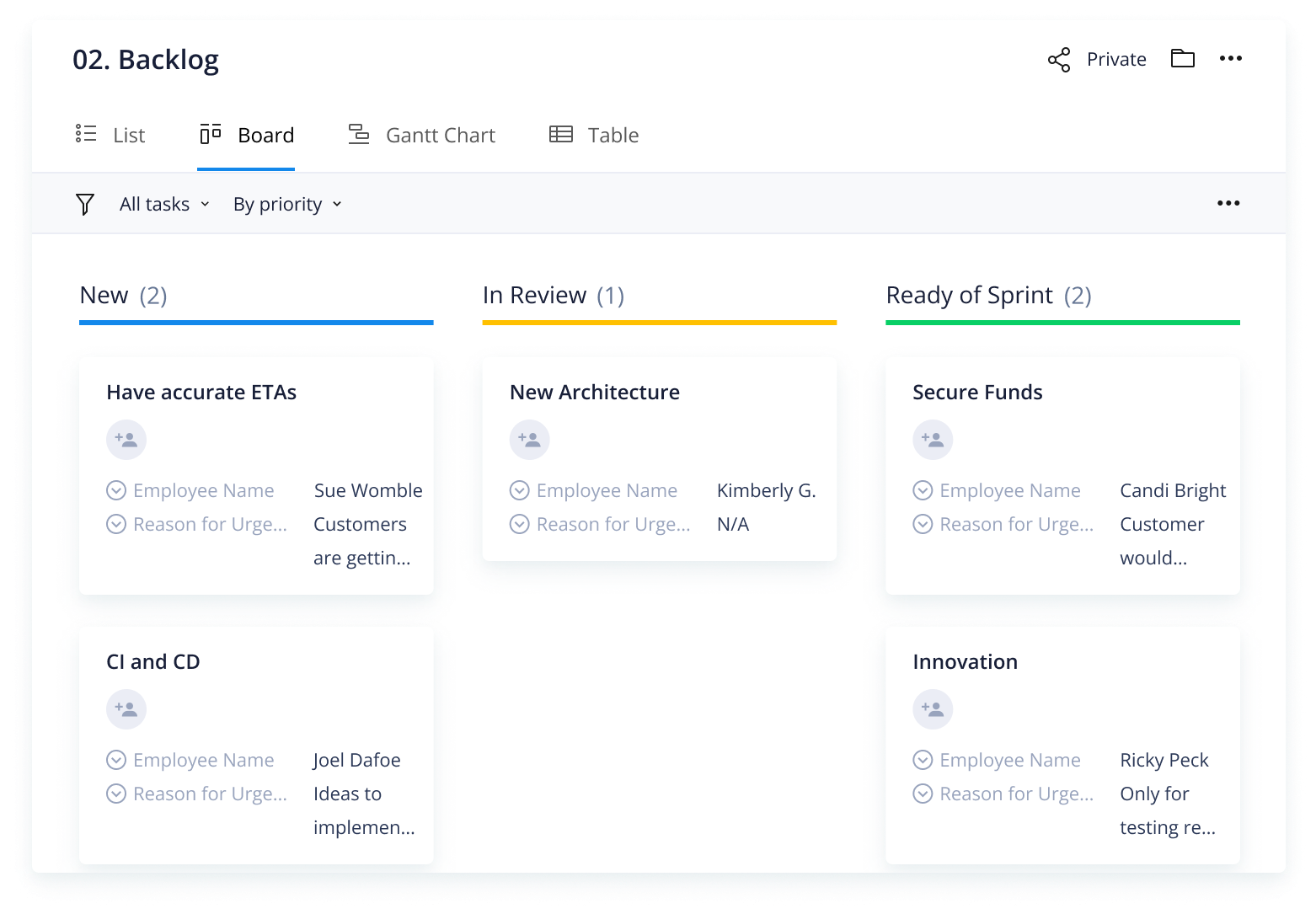
    A product backlog is a prioritized list of work the development team must complete to create or improve a product. It prioritizes features, fixes, requirements, and user stories, organized from highest to lowest priority.

    In Agile, the product backlog acts as the single source of truth for what the team will work on next. It helps teams stay aligned with the product vision and ensures that the most valuable work is completed first.

    Product backlog formats

    A product backlog can be managed in different formats depending on team size, location, and workflow:

    • Physical product backlog: Sticky notes, whiteboards, and index cards
    • Digital product backlog: Spreadsheets, text files, mind maps, or product backlog management tools (ideal for hybrid and remote teams)

    Though both options work, digital product backlogs are perfect for remote teams as they are easy to use and can be updated in real time.

    Benefits of a product backlog

    A healthy product backlog delivers clarity, alignment, and momentum. Below are the major benefits teams gain when their backlog is well-maintained and consistently refined.

    • Keeps projects organized: A backlog consolidates ideas, features, bugs, and technical work into a single, structured list. This eliminates scattered requests and prevents teams from losing track of important work.
    • Helps the product stay on track: With priorities clearly ordered, the team focuses on high-value work first — ensuring progress aligns with customer needs and the product roadmap.
    • Improves stakeholder engagement and alignment: A transparent backlog gives stakeholders visibility into what’s being considered, what’s coming next, and why certain work takes precedence.
    • Enables faster, high-quality delivery: Refined backlog items streamline sprint planning, reduce ambiguity, and speed up development cycles. Teams spend less time debating work and more time delivering value.
    • Supports flexibility and responsiveness: As the backlog evolves with new data, insights, or market changes, teams can quickly pivot without derailing progress or losing momentum.

    Product backlog vs. sprint backlog: What’s the difference? 

    Although they’re often confused, the product backlog and sprint backlog serve very different purposes in Agile and Scrum.

    A product backlog is the long-term, prioritized list of everything that may be built for the product. It includes features, enhancements, bugs, technical work, and user stories. The product owner maintains and prioritizes it based on business value, customer needs, and product strategy.

    A sprint backlog, by contrast, is a short-term plan of work that a development team commits to completing during a specific sprint. It includes selected product backlog items, plus the tasks required to deliver them.

    What are product backlog items? 

    Product backlog items (PBIs) are the individual pieces of work that make up a product backlog. Each item represents a task, requirement, improvement, or idea that moves the product closer to its goals. PBIs vary by team and company, but they all help define what needs to be built and why it matters.

    Different types of product backlog items include:

    • New features or functionalities that enhance the product
    • Updates to existing features, such as the product’s hardware, software, or infrastructure
    • Enhancements or changes requested to current functionalities
    • Bug fixes that improve performance or resolve issues
    • Technical requirements or changes
    • User stories that outline the tasks to be done 

    Well-structured product backlog items help Agile teams plan better, estimate work accurately, and ensure that development aligns with customer needs and business priorities.
    plaintext-templates_product-backlog_en_0plaintext-templates_product-backlog_en_0

    Product roadmap vs. product backlog

    Is a product roadmap the same as a product backlog? The idea that a product roadmap and backlog are the same is a common misconception. Though both are living documents created for Agile teams, the similarities stop there.

    A roadmap outlines the broad strategy. The backlog describes the actionable steps the development team needs to undertake. Here are the three main differences between a product backlog and a product roadmap:

    1. The product roadmap is strategic, while the backlog contains specific tactical steps, such as fixing product defects and user stories.
    2. The intended audience of the product roadmap is senior management or other stakeholders, while the backlog is a list created for the development/product teams.
    3. The roadmap describes the product's overall vision and strategy. The backlog articulates the elements that the team needs to work on to implement the strategy and achieve product goals.

    How to create a product backlog 

    A well-structured product backlog doesn’t happen by accident — it’s created through intentional collection, organization, prioritization, and refinement. Below are the essential steps to build a backlog that keeps your team aligned and your product development on track:

    1. Capture all product ideas and potential work
    2. Organize the backlog into a clear structure
    3. Prioritize the work that matters most
    4. Refine items and prepare them for development
    5. Effectively manage the product backlog 
    6. Use the product backlog to feed sprint planning or release planning

    Step 1: Capture all product ideas and potential work 

    • Start by gathering every idea, request, or requirement that could contribute to the product’s growth. A Wrike request form or intake workflow makes it easy to collect input from customers, internal teams, and stakeholders.

    • Create a dedicated space or folder — such as “Product Backlog”— and log each idea as its own task. These entries can represent anything from epics and user stories to bugs, technical upgrades, or exploratory research.

    Step 2: Organize the backlog into a clear structure 

    • Once items are collected, group them in a way that reflects how your team plans and thinks. You may organize by feature set, customer journey stage, product component, or upcoming release. 
    • Wrike’s custom fields help you tag items with relevant attributes like priority, business value, or team ownership. 
    • Defining a workflow — such as “Idea → Refinement → Ready → In Development → Done” — creates clarity and ensures each item moves through a consistent process.

    Step 3: Prioritize the work that matters most

    • Prioritization turns a raw list into a strategic plan. Wrike supports several prioritization methods, including stack ranking, MoSCoW categories, and Cost of Delay models. Regardless of the technique, the goal is the same: place the items that will create the most impact at the top. 
    • Lower-priority entries can remain less detailed until they move closer to being scheduled.

    Step 4: Refine items and prepare them for development

    • Backlog refinement ensures the team has a clear, actionable set of items ready for upcoming sprints. 
    • This process typically includes reviewing current data, uncovering insights, clarifying requirements, and revising estimates.
    • High-priority items should have well-defined acceptance criteria, known dependencies, and a clear description of what needs to be built. Items further down the backlog can remain high-level until they rise in priority.

    Step 5: Effectively manage the product backlog 

    • A product backlog isn’t static — it evolves as the team learns more and circumstances change. 
    • Regular grooming sessions ensure outdated ideas are removed, priorities are updated, and new requests are integrated. Feedback from stakeholders, performance metrics, and market shifts all influence what should be built next. 
    • Consistent upkeep keeps the backlog useful, relevant, and aligned with the product vision.

    Step 6: Use the product backlog to feed sprint planning or release planning

    • When planning a sprint or release, the team selects “ready” items from the top of the product backlog. 
    • These entries form the sprint backlog or release scope. 
    • Work that isn’t ready stays in the product backlog until it is refined; completed work cycles out of the backlog entirely. 
    • This approach ensures the team always focuses on the most valuable, well-defined items.

    Product backlog example 

    A product backlog can be organized in several ways depending on team size, product complexity, and Agile methodology. Some teams organize their backlog by components, categories, planning, or product goals, while others follow a strict epic → user story → task format.

    Below is a simple product backlog example that shows how larger product goals break down into actionable backlog items.

    • Epic or customer problem to be solved: Design a content management system that delivers exceptional content to readers
    • User story: Content editors want a streamlined content management system that releases high-quality content that’s optimized for search

    Product backlog items (PBIs)/features

    1. Log in to the content management system
    2. Edit a page of uploaded content
    3. Save the changes
    4. Run the search engine optimization tool on the reviewed content
    5. Make the requisite changes to the content
    6. Save the modified content
    7. Publish the edited content page on the website

    This example illustrates how an epic breaks into user stories and then into backlog items that deliver measurable value for both the user and the business.

    Who is accountable for ordering the product backlog? 

    In Scrum, the product owner is the person accountable for ordering the product backlog. They determine which items appear first based on customer value, business strategy, technical considerations, and feedback from across the organization. Ordering the product backlog ensures the development team is always focused on the most impactful work.

    Why does the product owner manage product backlog ordering?

    • They balance business goals and user needs: The product owner evaluates which items provide the most value and deserve priority.
    • They connect day-to-day work to the product roadmap: Ordering ensures backlog items support upcoming milestones and long-term direction.
    • They help the team deliver meaningful outcomes: A well-ordered backlog removes guesswork and keeps the team focused on clear priorities.

    Who can provide input into product backlogs? 

    While the product owner orders the backlog, they don’t work in isolation. Others contribute insights that help shape the final priorities:

    • Developers share technical estimates and constraints
    • Stakeholders provide business requirements and customer feedback
    • Scrum masters facilitate discussions but do not set priorities
    • End users offer real-world experience that influences ordering

    Although ideas and requests can come from many sources, the product owner makes the final decision on ordering the backlog. Their decisions help keep the product aligned with goals, timelines, and the broader product vision. Their role brings clarity to what matters most and keeps the team focused on meaningful outcomes.

    Ready to build a smarter, more actionable product backlog? 

    A well-optimized product backlog helps your team plan confidently, reduce rework, and stay aligned with customer needs. Wrike makes this easier by giving you product backlog templates, real-time visibility into priorities, and flexible views that support sprint planning and cross-team collaboration.

    Start your free trial now to see how Wrike can strengthen your product management workflow and support successful product launches.

    FAQs: Product backlog 

    A product backlog includes all work that could improve the product, such as new features, enhancements, bug fixes, technical tasks, research, and user stories. Items are ordered by customer value, business goals, and team capacity, so developers always know what to work on next.

    A product backlog is a long-term, evolving list of all work that could be completed for the product. A sprint backlog is a short-term list of items the development team commits to completing during a single sprint. The product backlog is owned by the product owner, while the sprint backlog is created and managed by the development team.

    A strong product backlog is prioritized, refined, and actionable. Items are ordered by value, updated regularly as needs change, and written clearly enough for the team to understand, estimate, and plan effectively.

    Common mistakes include letting the backlog grow without removing outdated items, failing to prioritize based on value, writing unclear user stories, and ignoring technical debt. Inconsistent refinement and not involving key stakeholders can also weaken backlog quality.

    The product owner creates and maintains the product backlog. They gather input from stakeholders, customers, and the development team, then organize this information into clear backlog items that reflect the product vision and business priorities.

    • Product
      • Product tour
      • Pricing
      • Templates
      • Apps & Integrations
      • Task Management
      • Gantt Charts
      • Wrike Status
      • Security
      • Wrike API
      • Compare
      • Features
    • Solutions
      • Enterprise
      • Marketing
      • Creative
      • Project Management
      • Product Development
      • Business Operations
      • Professional Services
      • IT Management
      • Students
      • All Teams
      • All Use Cases
    • Resources
      • Help Center
      • Community
      • Blog
      • Webinars
      • Interactive Training
      • Support Packages
      • Find a Reseller
      • Google Project Management Tools
      • CA Notice at Collection
    • Company
      • About Us
      • Leadership
      • Careers
      • Our Customers
      • Events
      • Newsroom
      • Partner Program
      • Collaborate - User Conference
      • Wrike Engineering
      • Contact Us
    • Guides
      • Project Management Guide
      • Professional Services Guide
      • Workflow Guide
      • Kanban Guide
      • Agile Guide
      • Scrum Guide
      • Marketing Project Management Guide
      • Collaborative Work Management Guide
      • Digital Marketing Guide
      • Go-to-Market Guide
      • Remote Work Guide
      • Return to Work Guide
      • Product Management Guide
      • Goal Setting Guide
    • Latest in Wrike Blog
      • Asana vs. Monday.com: A detailed comparison & alternative
      • AI is shaking up collaborative work management
      • AI + HI: The best of both worlds
      • Simple solutions for onboarding at scale
      • Will AI replace project managers?
      • Elite 100 finalists: How 3 Wrike customers drive innovation
      • Wrike AI: Our freshest features and newest innovations

    Subscribe to Wrike news and updates

    Stay informed with the latest news and updates by subscribing to our marketing emails.

    AICPA logo.Footer icon BSI.Footer icon CSA star.

    Enterprise-Grade Security.
    Uptime Over 99.9%

    ©2006-2025 Wrike, Inc. All rights reserved. Patented. Privacy Policy. Terms of Service. Cookie Preferences. Your Privacy Choices

    ICP备案/许可证号: 京ICP备16031568号-2

    Wrike logo
